
 Vending Machines
State-of-the-art vending machines stocked with snacks, beverages, healthy options, specialty items, available 24/7.

 Micromarkets
Open-shelf, unattended convenience with fresh food, snacks, and beverages using self checkout.

 Frictionless Stores
Checkout-free stores where customers tap in, grab what they want, and walk out.

 Office Coffee & Refreshments
Customized workplace coffee and pantry programs, with brewers, beans, snacks and supplies installed, restocked and maintained.


Get in Touch
Contact Us
Have a question, need support, or want to explore our solutions? Our team is here to help. Fill out the form and a member of our team will get back to you shortly.
Reach Us Directly:
How do I locate the last 4 digits for a refund with Apple Pay, Google Pay, or Samsung Pay?
If you used a mobile wallet to pay, such as Apple Pay or Google Pay, the card number that is used to process the transaction is not the same as your physical card.
Please follow the instructions below to lookup the last 4 digits in order to create a support request.
Apple Pay
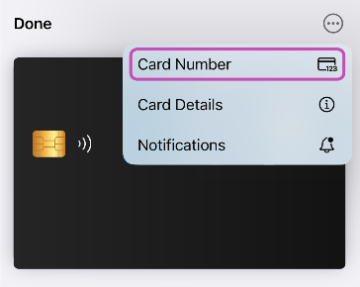
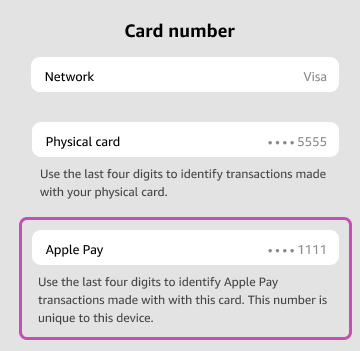
Open the Wallet app on your phone. Select the card that you used, and press the three dots (...) on the upper right corner. Select "Card Number". Provide the 4 digits shown under "Apple Pay".
Google Pay
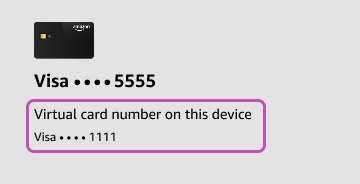
Open the Wallet app on your phone. Select the card that you used, and press the three dots (...) on the upper right corner. Provide the 4 digits shown under "Virtual Account Number".
Samsung Pay
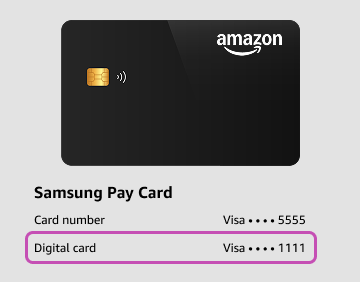
Open the Wallet app on your phone. Select the card that you used. Provide the 4 digits shown under "Digital Card Number".
How do I request a refund?
To request a refund, please submit a new support request. Please note that refunds are validated on a case-by-case basis.
Click on "Submit a Request" on the top right corner of this help center. If you are reading this on a mobile device or a device with a smaller screen, this link may be hidden in the hamburger menu button.
Select "Refund Request" as the request type and you will be prompted to complete the form. Please ensure it is accurately filled out.
If this is your first time submitting a request on this system, you may be asked to verify your email. Please ensure that you complete the account activation process to submit the ticket.
NOTE: If the card reader displayed "Dispensing Error", this indicates the machine determined the item did not dispense and has already reversed the funds back to your account. You will not need to submit a refund request in this situation.
The more detailed the support request, the quicker we can verify and process a refund.
In the case of machine malfunction, there may be a validation and reconciliation process. The length of this process depends on when the machine in question is serviced.
All refund requests are processed electronically. We are unable to provide refunds by cash or cheques.
My debit or credit card was overcharged!
Vending Machines
Some vending machines may put a preauthorization on your credit or debit card.
As it does not know the products you are going to select ahead of time, the way card readers on vending machines work is not unlike a gas pump. The card processor will put a preauthorization on your account when you are attempting to use the card at a machine. Similar to a gas pump, you may see a “PENDING” hold for a higher amount than what is purchased. You will only be charged for the items dispensed. For any questions about the hold policy of the funds, please contact your bank.
With the popularity of mobile apps for banking and mobile wallets, you will likely see this preauthorized amount appear on your mobile device, even if you cancel the transaction at the vending machine before making a selection. The preauthorization will disappear, typically within 72 hours, and be replaced with the final amount charged. This is an automatic process: please do not create a ticket for open preauthorizations - it will automatically disappear and be replaced with the correct amount when the transaction settles.
Smart Coolers
If you used an Adaria smart cooler, whereby you provided payment and removed items from a fridge, please allow up to 24 hours for the transaction to settle and the proper amount to reflect on your card. Smart coolers authorize a certain amount prior to unlocking the door to ensure you have enough funds on your card to cover purchases. This authorization will be removed when the transaction settles.
I didn't get my product but I was charged!
Most drink and snack vending machines have a guaranteed delivery system, which is a sensor inside the machine that detects whether the product came out or not. There are instances when products do not properly dispense, like when the machine is out of stock or the product gets caught and the machine can't get it out.
The machine should automatically retry up to 3 times to dispense the product. If it still does not dispense, the card reader should display a message indicating product not dispensed. If you see this message on the reader, the machine has automatically voided your purchase and you were not charged for the transaction. Depending on your financial institution, it may take up to 72 business hours before this void is shown back on your statement.
If the card reader displayed a thank you message with a total amount charged, then the machine charged you for the purchase. Please reach out to us if you did not receive your product in this case and we will open an investigation to see what may have occurred.
I used the PayRange application before but can't use it anymore.
Certain machines supported the PayRange mobile application at one point. As machines are being upgraded to support direct credit and debit card usage, the PayRange system is being phased out on some of these vendors.
If you need a refund of your PayRange balance, please contact PayRange. A machine that no longer supports PayRange will no longer have PayRange acceptance decals.
I had a problem with a Coca-Cola machine beside yours. Can you help?
If the Coca-Cola machine you used has a Adaria sticker on it with a 4-digit machine ID, please create a ticket on this system.
If the Coca-Cola machine does not have a Adaria sticker on it, please call the Coca-Cola customer service center at 1-800-218-2653. You will need to provide the outlet or customer number on the machine to the Coca-Cola representative for assistance.
I had a problem with a vending machine that doesn't have a contact sticker on it. I got your contact details from the machine beside it. Can you help me?
Generally speaking, the only machines we handle customer service requests for are those with a 4-digit machine ID with a Adaria sticker on it.
If it does not have a Adaria sticker on the machine stating that is operated and serviced by Adaria, please refer to the machine itself to see if there is any alternate contact information.
Adaria provides last mile fulfillment services for other vending machines that are not owned by us, so even if it is the same person restocking the machine, we are not able to assist with customer service requests for machines belonging to other companies.
Service Areas
Adaria provides unattended retail and refreshment solutions across multiple regions. Use the map below to see where we currently operate.
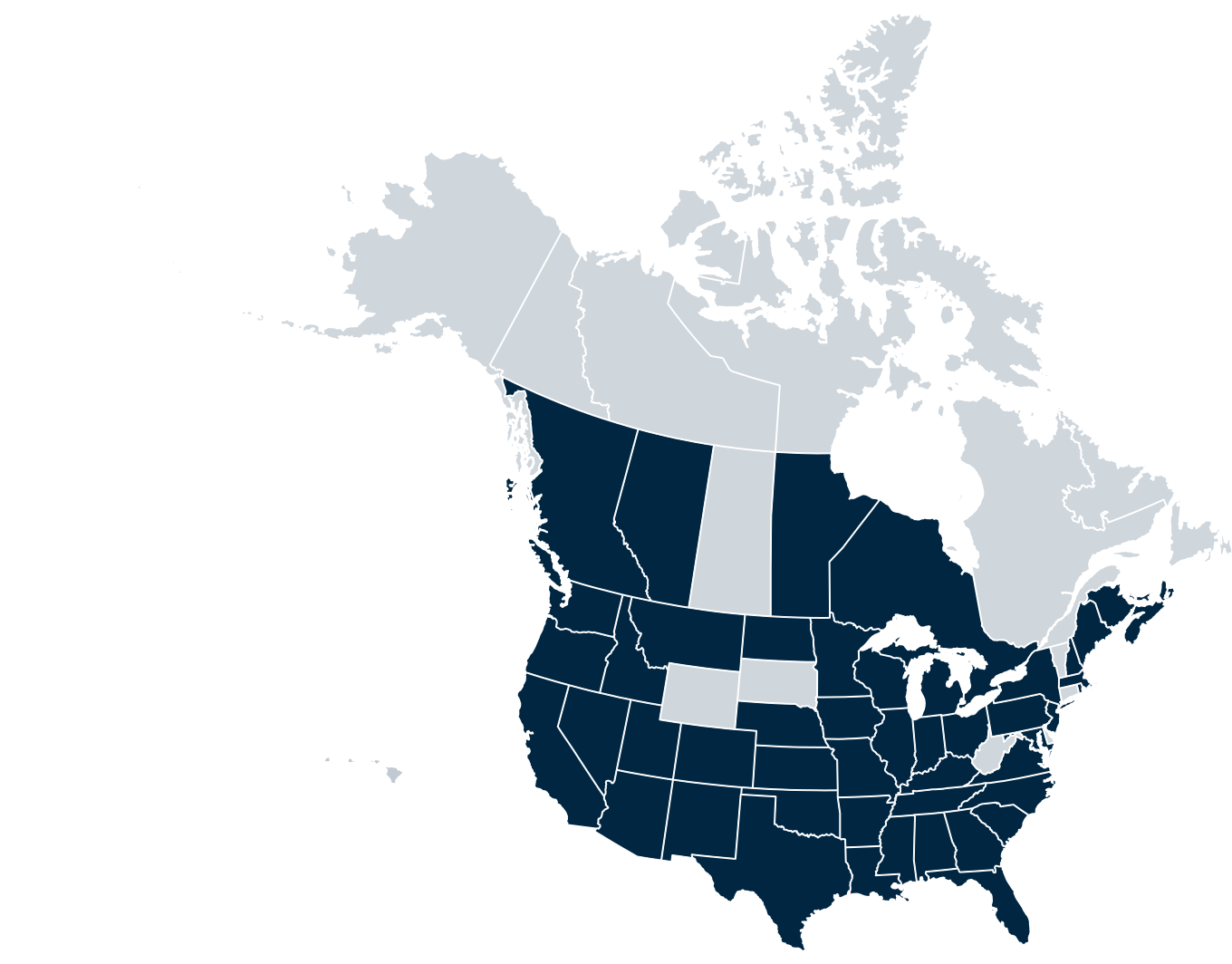
Canada
• British Columbia: Lower Mainland, Vancouver, Victoria and surrounding areas
• Alberta: Calgary, Edmonton, Ft. McMurray, and surrounding areas
• Manitoba: Winnipeg and surrounding areas
• Ontario: Toronto, Ottawa, Kitchener-Waterloo, Kingston, Barrie, and surrounding areas
• New Brunswick
• Nova Scotia
• Prince Edward Island
USA
Alabama, Arizona, Arkansas, California, Colorado, Florida, Georgia, Hawaii, Idaho, Illinois, Indiana, Iowa, Kansas, Kentucky, Louisiana, Maine, Maryland, Massachusetts, Michigan, Minnesota, Mississippi, Missouri, Montana, Nebraska, Nevada, New Hampshire, New Jersey, New Mexico, New York, North Carolina, North Dakota, Ohio, Oklahoma, Oregon, Pennsylvania, Rhode Island, South Carolina, Tennessee, Texas, Utah, Virginia, Washington, Wisconsin